
Portable Red Light Therapy Device (75W) ManualUpdated 8 months ago
Device Overview
The 75W portable red light therapy device is designed for convenient, on-the-go use. All controls are located on the top of the device and displayed on the control screen.
Device Setup
- Use the top control panel buttons to operate the device.
- Switch the machine on at the top of the device by holding down the red power button found on your right hand side.
- To turn the device off, press and hold the same power button again.
Control Panel Overview
The control panel has 2 buttons, arranged from left to right.
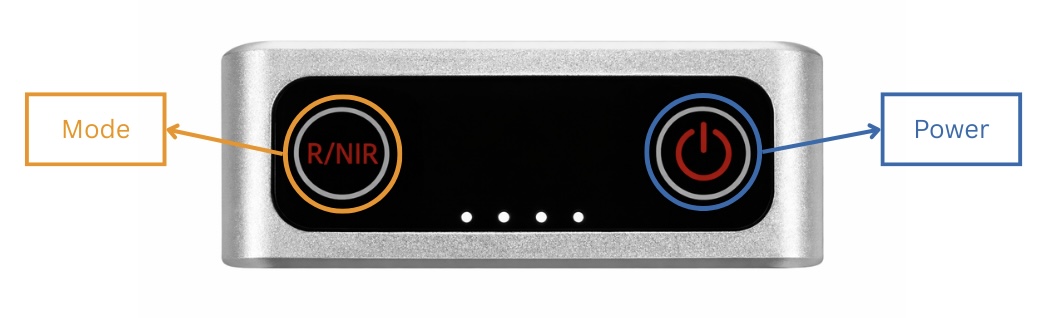
Button Functions (Left to Right)
1st Button: Light Mode (Left button)
Press the button to cycle through the following modes:
- L1: R + IR – Red and Near Infrared working together
- L2: R – Red light only
- L3: IR – Near Infrared light only
2nd Button: Power (Right button)
This button turns the device on and off by holding it down.
Battery Indicator
- The dots at the bottom, in the middle of the control screen, indicate the battery life.
- Fewer dots mean lower battery and the device should be charged.
Timer Function
- When the control screen displays “10”, this indicates the session time to be 10-minutes.
Charging the Device
- The charging port is located underneath the panel.
- Fully charge the device before first use for optimal performance.