
Red Light Therapy Full Body Panel (1200W) ManualUpdated 8 months ago
Device Setup
- Plug the device into a power socket.
- Switch the machine on at the back of the device by pressing the red power button down.
- Use the front control panel buttons to operate the device.
Control Panel Overview
The control panel has 4 buttons, arranged from left to right
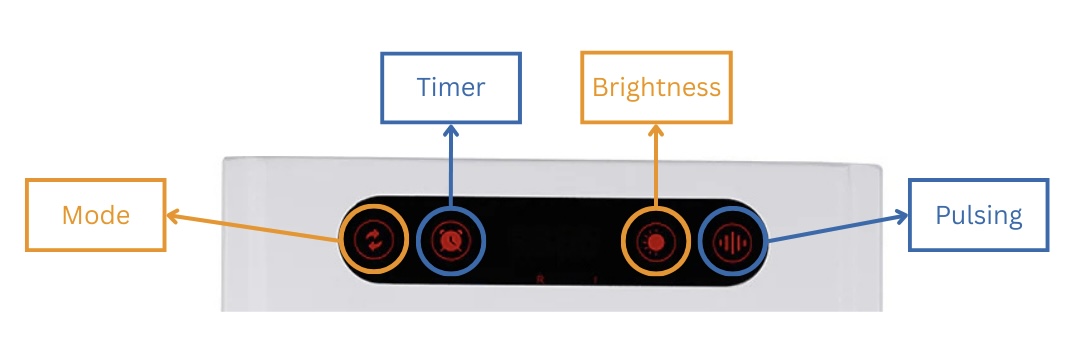
Button Functions (Left to Right)
1st Button: Power & Light Mode
This button turns the lights on and off and allows you to change the light mode.
Press the button to cycle through the following modes:
- R I – Red and Near Infrared on together
- R – Red light only
- I – Near Infrared only
- Off – Lights are off
2nd Button: Timer Function
Use this button to set the session duration.
Available time settings:
- 20 minutes
- 25 minutes
- 30 minutes
- ON – Lights stay on continuously with no time limit
3rd Button: Brightness Function
This button adjusts the brightness of the lights.
Brightness levels:
- 25%
- 50%
- 75%
- 100%
You can adjust brightness based on comfort, distance from the panel, and experience level.
4th Button: Pulsing Function
This button controls the pulsing mode of the lights.
Pulsing options:
- 10 Hz
- 20 Hz
- 40 Hz
- ON – Continuous light with no pulsing